標籤

ASP.NET MVC (29) Visual C# (15) JQuery (10) Plugins (8) JQuery Plugins (6) JavaScript (6) MySQL (5) CSS (4) LinQ (4) Mac OS (4) CentOS (3) Design Pattern (3) Entity Framework (3) IIS (3) Python (3) Windows (3) php (3) Docker (2) LAMP (2) SQL Server (2) WCF (2) .NET (1) .NET Core (1) AWS (1) Browser (1) GIS (1) IE (1) Internet Security (1) Linux (1) Platform (1) React (1) SEO (1) Testing (1) VMware (1) Windows 7 (1) cookie (1) curl (1) laravel (1) phpBB (1) session (1) 中古屋 (1) 透天 (1) 閒言閒語 (1) 面試 (1) 鳥松 (1)

2018年5月1日 星期二

啟動docker時出現「Cannot start service :driver failed programming external connectivity on endpoint xxx, Bind for 0.0.0.0:80 failed: port is already allocated 」

啟動docker時出現「Cannot start service :driver failed programming external connectivity on endpoint xxx, Bind for 0.0.0.0:80 failed: port is already allocated 」

解決紀錄:

出現錯誤時先把docker關閉
✗ docker-compose down


再次啟動docker
✗ docker-compose up


發現還是一樣的錯誤訊息
ERROR: for dockerdevenv_php_1  Cannot start service xxx: driver failed programming external connectivity on endpoint xxx (3fb2445adf3cf07061d859f478293b90af21f793b1b01ba5f23203f145d7342f): Bind for 0.0.0.0:80 failed: port is already allocated


想找出是什麼process佔住80 port, 所以關閉docker後輸入下列指令「lsof -nP +c 15 | grep LISTEN」


恩, 用kill -9結束process


再次啟動docker, 成功~


2017年9月28日 星期四

[測試] IE在Windows的前端測試環境


Web開發後的測試是比較頭痛的問題, 有時前端套用的framework(例如Vue.js or Angular.js),

甚至CSS語法 或 pure javascript語法, 都會有IE不相容或不支援的狀況.

為了可以提早在測試先發現這些Bug,

微軟有提供IE & Edge 版本的虛擬環境(VM)讓開發人員方便測試,


目前提供的瀏覽器版本有

  • IE8 on Win7 (x86)
  • IE9 on Win7 (x86)
  • IE10 on Win7 (x86)
  • IE11 on Win7 (x86)
  • IE11 on Win81 (x86)
  • MSEdge on Win10 (x64) Stable (15.15063)
  • MSEdge on Win10 (x64) Preview (16.16257)


目前提供的虛擬環境版本有

  • VirtualBox
  • Vagrant
  • HyperV (Windows)
  • VPC (Windows)
  • VMware (Windows, Mac)
  • Parallels (Mac)

下載網頁, 點我. 可以選擇自己需要的IE版本與虛擬環境


下載後為*.zip檔案, 解壓縮後可以掛到自己的VM, 打開畫面如下(以IE11 in Parallels)


等待安裝完成後, 就可以開始使用IE測試囉~


Reference


2017年4月26日 星期三

curl 指令如何使用 cookie

curl 是可以取得網頁內容的指令

語法是

➜  ~ curl  "https://www.google.com"

如果想要保持連線狀態的話就必須透過cookie來達成,

curl可以使用檔案方式來讀寫cookie, 語法為-c

➜  ~ curl -c googlecookie "http://www.google.com.tw/"

使用並讀取該cookie的語法為-b

➜  ~ curl -b googlecookie "http://www.google.com.tw/"/"

可用cat觀看cookie保存的資訊:
➜  ~ cat googlecookie   
                             
# Netscape HTTP Cookie File
# http://curl.haxx.se/docs/http-cookies.html
# This file was generated by libcurl! Edit at your own risk.
#HttpOnly_.google.com.tw TRUE / FALSE 1509019185 NID 102=K7YGg2AnB0sRuEW2fBj-YlogUpgBellyQFZZ7efgcUFJRjbDE1jLm9ky-aji2F4KEDtCxY6_Pxdu7xBtiKxtgBaCT7nz7gsOzUiMPTVJ0lZHajlOUjVkimkg4YPJrWJ5


如果想要多帶參數, 可以使用-d, 想帶referer網址可以使用--referer

➜  ~ curl -c googlecookie "http://www.google.com.tw/" -d "A=a" -d "B=b" --referer "http://www.google.com.tw/"


Reference:


HTTP Cookies
curl: how to send cookies via command line?


2017年2月6日 星期一

PHP MySQL 出現 「Fatal error: Call to undefined method mysqli_stmt::get_result()」

Fatal error: Call to undefined method mysqli_stmt::get_result()

原因是PHP透過MySQLi使用prepare statement, 必須要安裝mysqlnd driver

Mac環境似乎預設就有載入,


Reference:

1. mysqli_stmt::get_result

2. StackOverflow: Call to undefined method mysqli_stmt::get_result

3. MySQL Native Driver


2016年11月22日 星期二

[PHP] Laravel syntax error, unexpected '[' in guzzlehttp/guzzle/src/functions.php on line ...


這幾天重新安裝Laravel時, 發現apache出現PHP錯誤

syntax error, unexpected '[' in guzzlehttp/guzzle/src/functions.php on line


看訊息一開始以為是guzzle http client有錯誤,

查詢後發現原來[]語法代表陣列是PHP5.4之後的版本才支援,

如果是使用PHP5.3或更早版本則會出現語法錯誤(Parse error).

解決方式是將PHP升級至5.4或者更新版本即可.


Reference:

1. i have error in laravel on function /vendor/guzzlehttp/psr7/src/functions.php on line 77 [duplicate]


2016年10月20日 星期四

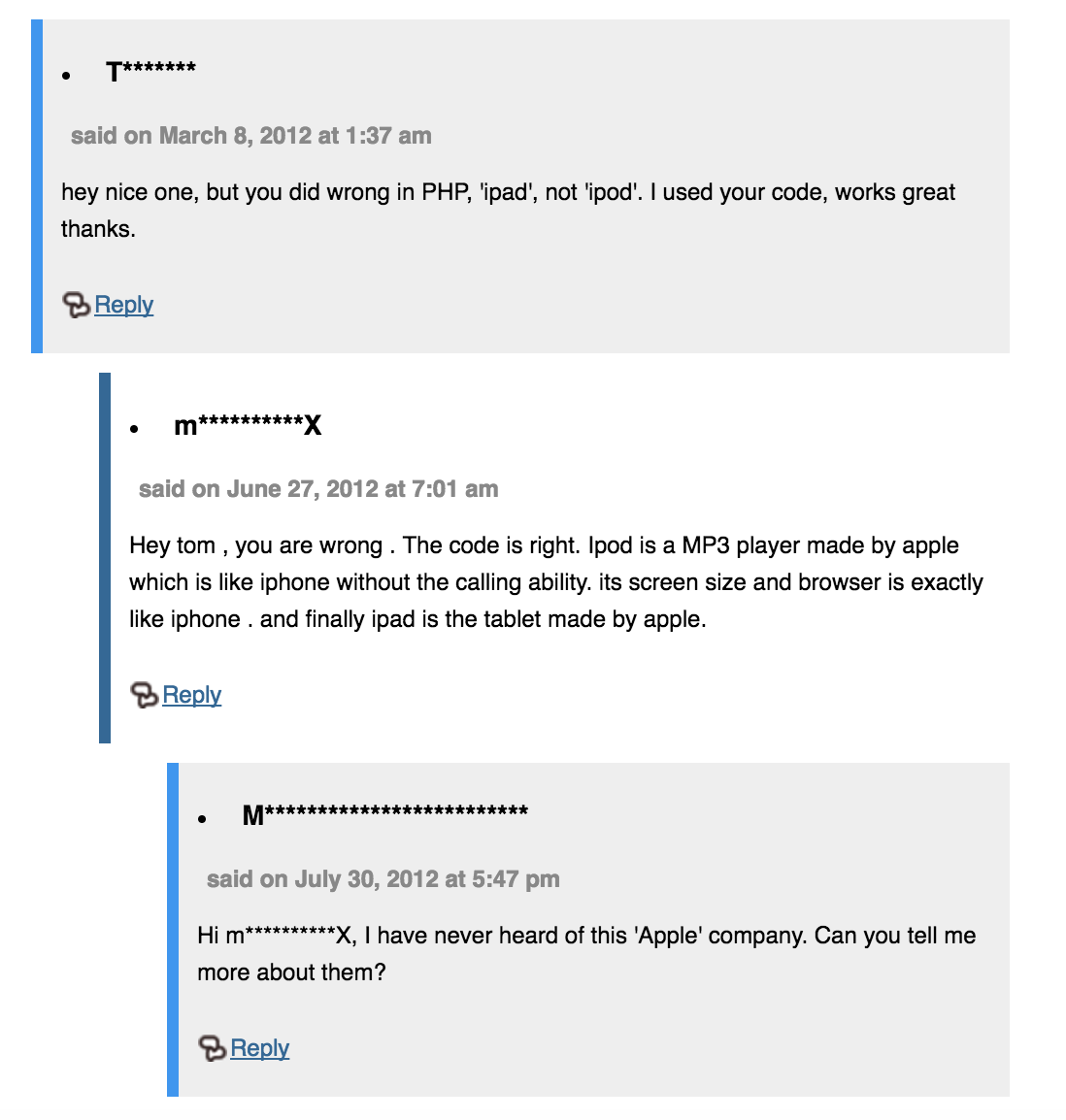
[閒聊] 我從沒聽說過這間"蘋果"公司, 可以請你跟我多說一點嘛?


I have never heard of this 'Apple' company. 

Can you tell me more about them?


昨天在網路上查找資料, 看到了一個有趣的問答


純粹博君一笑...